Deployment Options
Securely Deploy Where Your Data Lives
Every codebase, pipeline, database, and SaaS tool —connected at the data and intent level. Plugs into your existing lineage, catalog, and observability tools without replacing them.

.avif)

Genesis on AWS
Amazon EKS
Cloud-Native Kubernetes
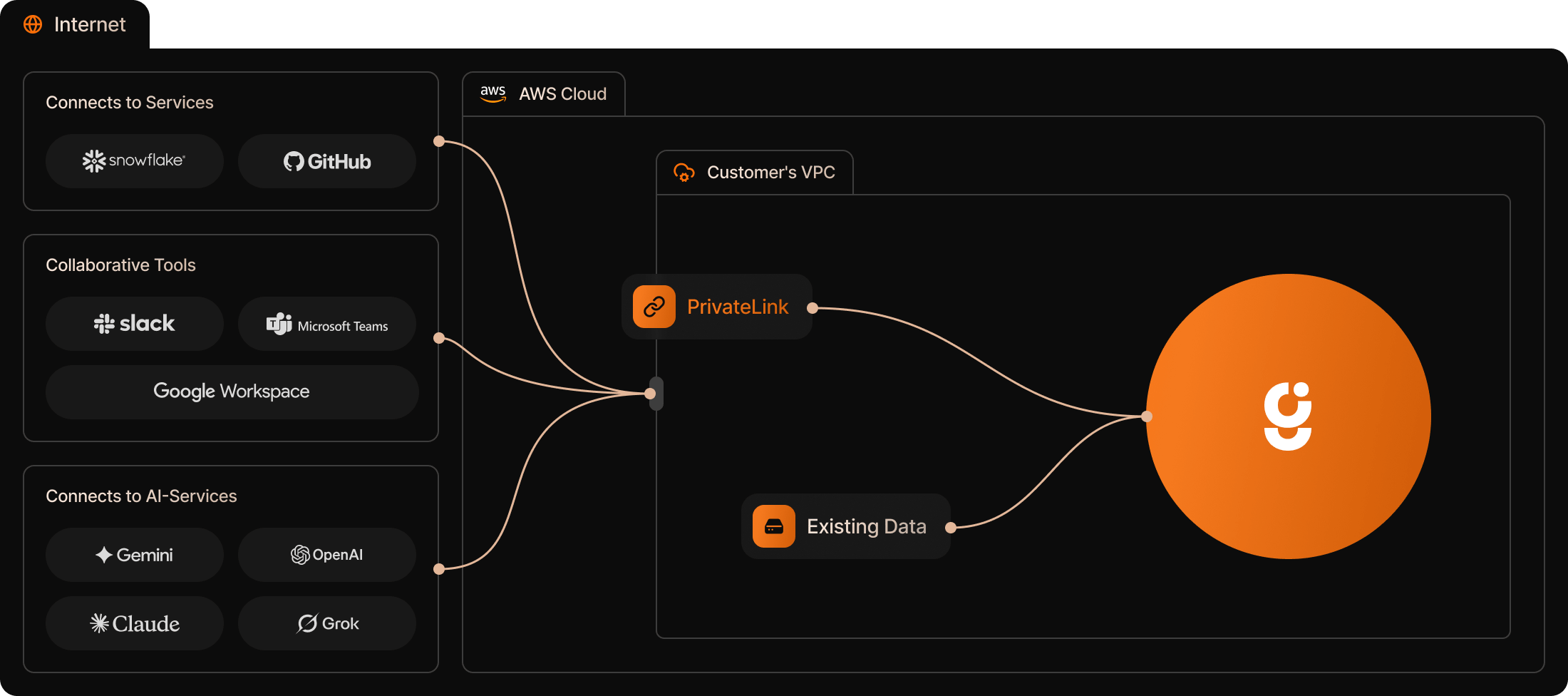
Deploy the Genesis container to an existing EKS cluster in your VPC. Agents operate within your AWS account boundary with IAM role-based access to data services. Uses your existing AWS security model — IAM roles, VPC boundaries, and KMS encryption.
Genesis agents access S3, Glue, Redshift, RDS, and other services through your configured IAM policies. All processing stays within your AWS account: no data egress, no external API calls unless you explicitly configure them.
Genesis agents access S3, Glue, Redshift, RDS, and other services through your configured IAM policies. All processing stays within your AWS account: no data egress, no external API calls unless you explicitly configure them.
Native Integrations
EKS
IAM Roles
Redshift
S3
Secrets Manager
ECR
Glue
CloudWatch
EventBridge
Infrastructure Requirements
Cluster
EKS cluster with Kubernetes 1.24+
Compute
Minimum 4 cores / 16 GB RAM
Network
VPC with Private Subnet Access
Auth
IAM roles for service accounts (IRSA)
Storage
S3 for Persistent State
Secrets
Secrets Manager or Parameter Store

Genesis on Azure
Azure AKS
Cloud-Native Kubernetes
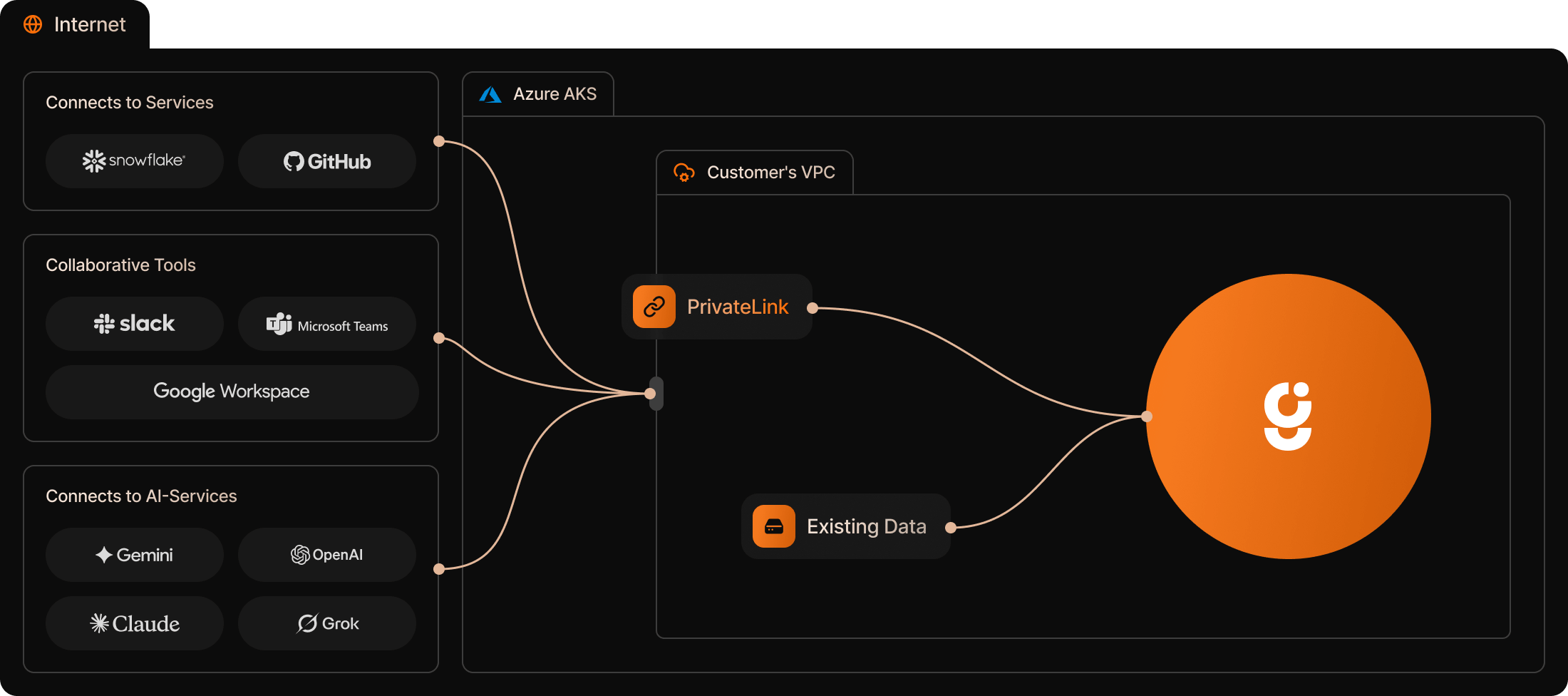
Run Genesis agents on an AKS cluster within your Azure subscription. Integrates with Microsoft Entra ID for identity, Key Vault for secrets, and Azure data services through VNET-peered private networking.Genesis uses your existing Azure security model: Managed Identities, VNET isolation, and Azure Key Vault. All agent processing stays within your Azure subscription boundary with full audit trail integration.
Native Integrations
AKS
Entra ID
Key Vault
Azure Fabric
Synapse
VNET Peering
Azure Monitor
ACR
Azure Purview
Infrastructure Requirements
Cluster
AKS cluster with Kubernetes 1.24+
Compute
Minimum 4 cores / 16 GB RAM
Network
VNET with Private Subnet Access
Auth
Azure Managed Identities / Entra ID
Storage
Blob Storage for persistent state
Secrets
Azure Key Vault

Genesis on Databricks
Validated Technology Partner
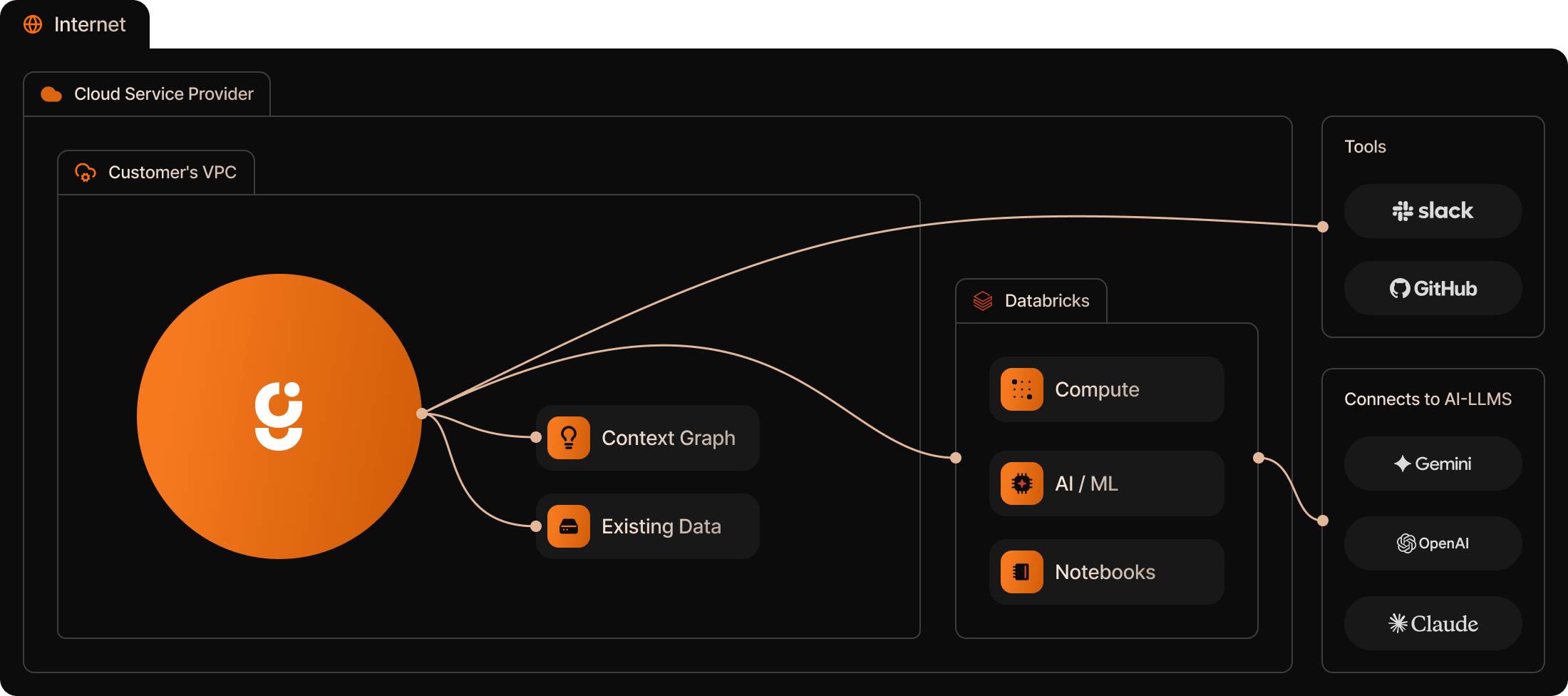
Genesis runs natively on Databricks without requiring external infrastructure. The deployment uses Databricks-native services for the web interface, agent compute, and internal coordination — everything stays within your workspace.
Once deployed, Genesis agents autonomously handle pipeline development, maintenance, data quality testing, and operational monitoring — all using your existing Databricks compute and permissions model. Agents interact with your Unity Catalog assets and Delta Lake tables natively.
Once deployed, Genesis agents autonomously handle pipeline development, maintenance, data quality testing, and operational monitoring — all using your existing Databricks compute and permissions model. Agents interact with your Unity Catalog assets and Delta Lake tables natively.
Native Integrations
Delta Lake
Unity Catalog
Databricks Workflows
Delta Live Tables
Databricks SQL
MLflow
Databricks Notebooks
dbt on Databricks
Apache Spark
Infrastructure Requirements
Sizing
Minimum 4 cores / 16 GB RAM on compute
Runtime
Databricks-managed compute
Tools
VPC with Private Subnet Access
Workspace
Databricks workspace with Apps and Compute enabled
Model Access
Databricks Model Serving, OpenAI, or other LLM
Network
Workspace-internal connectivity between services
Network
Workspace-internal connectivity between services

Docker
Container-Based Deployment
Run Genesis locally or on-premise using Docker — the only prerequisite. Run a single install script, then start the server. Ideal for air-gapped environments, custom VPC configurations, or quick local evaluation.
Native Integrations
Air-gapped
On-premise
Local Evaluation
CLI & Web UI
Self-hosted LLM

Genesis on Snowflake
Validated Technology Partner
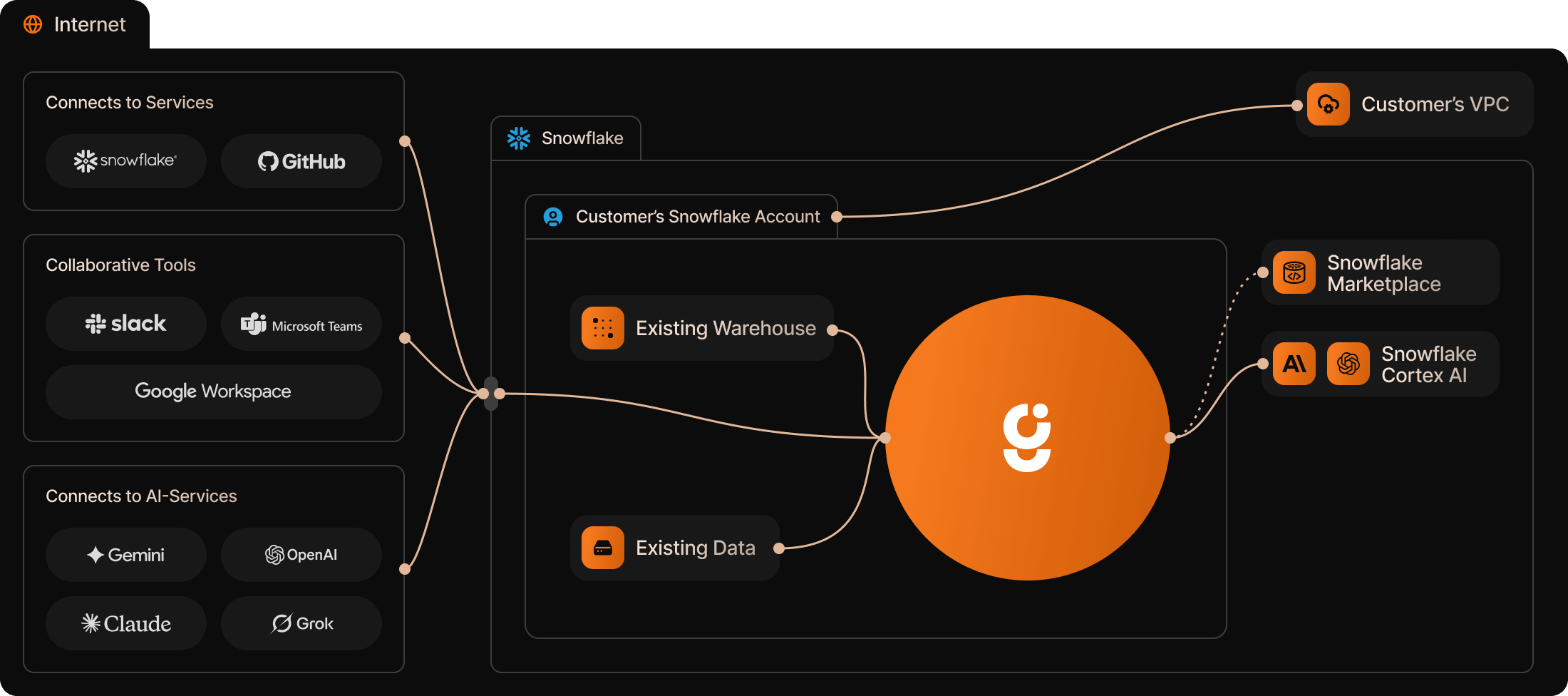
Genesis installs directly into your Snowflake account from the Snowflake Marketplace. The application runs entirely within your Snowflake environment via Snowpark Container Services — Genesis Computing cannot see your data, your agent conversations, or your pipeline configurations.
Agents are powered by Snowflake Cortex AI by default, meaning no prompts or data ever leave your Snowflake account. Genesis is model-agnostic, so you can also choose to use other models such as OpenAI or Amazon Bedrock by providing your own keys.
Agents are powered by Snowflake Cortex AI by default, meaning no prompts or data ever leave your Snowflake account. Genesis is model-agnostic, so you can also choose to use other models such as OpenAI or Amazon Bedrock by providing your own keys.
Native Integrations
Snowpark Container Services
Cortex AI
Native App Framework
Snowflake Marketplace
Snowflake RBAC
Dynamic Tables
Snowflake Tasks
dbt on Snowflake
Snowflake Data Catalog
Streamlit in Snowflake
Infrastructure Requirements
Install
Snowflake Marketplace (one click)
Role
ACCOUNTADMIN for installation
Compute
Snowpark Container Services
AI Model
Cortex AI (default) or bring your own key
Messaging
Slack or Teams (optional, your keys)
Data Egress
Zero – agents never leave your account

Security Model
Zero Data Egress. Zero Trust Architecture.
Genesis agents never pull data out of your environment. All processing happens inside your cloud account using your compute, your permissions, and your keys.
Data Never Leaves
Agents operate entirely within your cloud perimeter.
Your Keys, Your Control
Genesis uses your existing KMS and secrets management.
RBAC Inherited
Agents respect your existing platform permissions.
Compliance Ready
Inherits your cloud platform's compliance posture.